
Ranked #3 of 5 · Reviewed October 2026
TraderSync Review (2026): Widest Broker Sync, Steep Top Tier
Mobile-first journaling with one of the longest broker-integration lists in the category and conversational AI analysis.
Quick verdict
TraderSync earns its place on the strength of integrations and mobile. If your broker is obscure, its 700+ list is the safest bet. Otherwise, newer tools deliver a cleaner experience for less.
What is TraderSync?
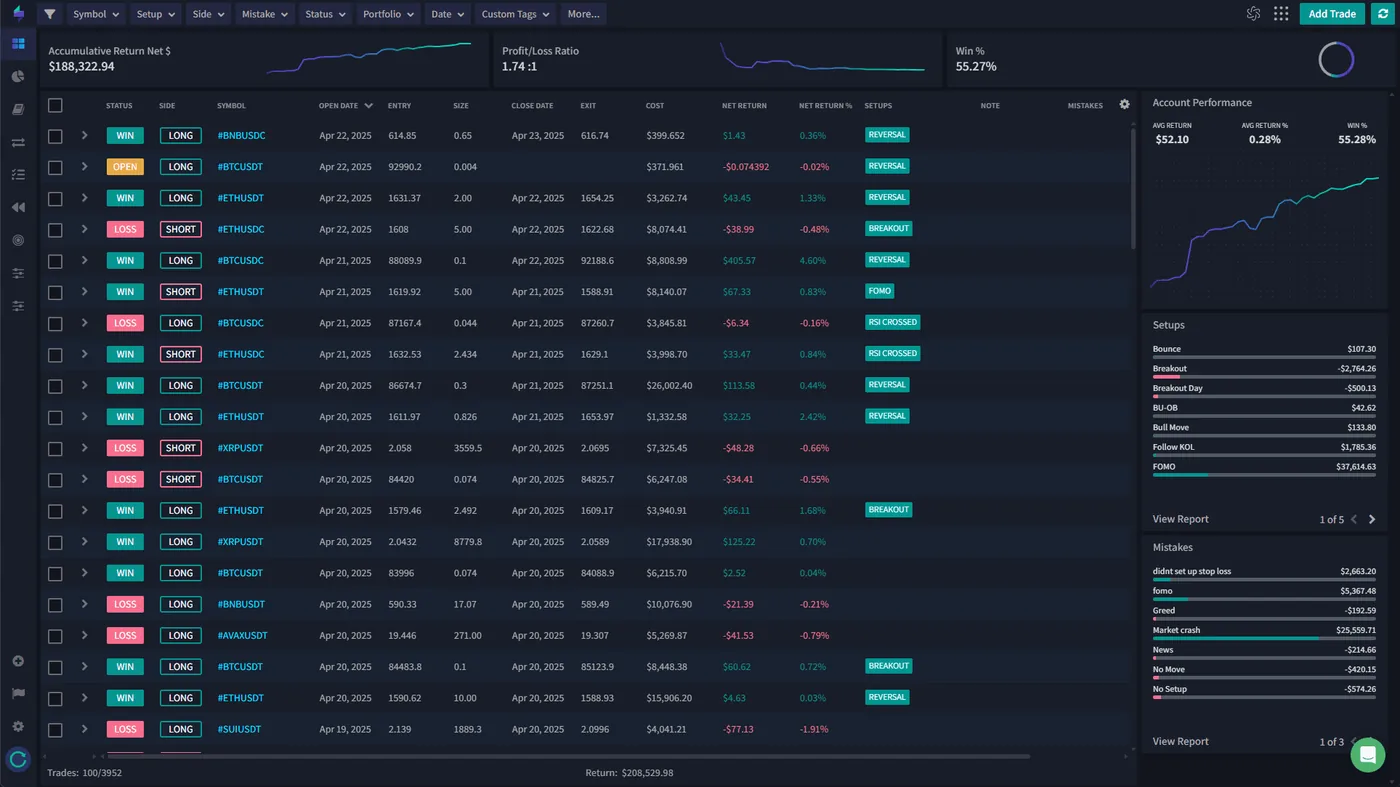
TraderSync is a cloud-based trading journal built around three ideas that set it apart from most rivals: an unusually broad broker network, a conversational AI coach, and market replay that can rewind your executions down to a fraction of a second. Rather than positioning itself purely as an analytics dashboard, TraderSync leans on interaction, letting you ask questions of your own trade history and get coached on your patterns rather than simply reading reports and drawing your own conclusions.
The platform connects to more than 700 brokers and trading platforms, which is the widest integration list we have come across in the category. That coverage stretches well past the usual U.S. names to include niche regional brokers, futures and forex specialists, and a long list of prop firms, so multi-broker and international traders are far less likely to hit a wall than they would elsewhere. Supported assets span stocks, options, futures, forex, and crypto, and trades arrive through direct API sync, file upload, or manual entry depending on the broker.
TraderSync carries a 4.7/5 Trustpilot rating from several hundred reviews and is frequently praised for its native iOS and Android apps, which is a rarity in a field where most competitors offer nothing more than a responsive web page. In our testing it lands as our #3 overall pick. Its standout strengths are that enormous integration list and a genuinely polished mobile experience; the reservations are that the interface feels dated next to newer tools and that the features most people actually want sit on higher tiers that climb toward the expensive end of the market. The sections below walk through what stands out and where it falls short.
Key features
Cypher AI: A Conversational Trading Coach
Cypher AI is TraderSync's headline feature and its clearest point of differentiation. Where most journals bolt on an AI layer that spits out a canned daily or weekly summary, Cypher works as a chat interface embedded in your dashboard. You can ask it plain-language questions, what time of day you trade best, which setups underperform on Mondays, whether your win rate holds up when position size climbs, and it answers from your actual logged trades rather than generic advice. The experience is closer to messaging a mentor than running a report, and you can drill down with follow-ups to steer the analysis toward whatever you are currently trying to fix.
The trade-off is that Cypher needs data to earn its keep. With only a handful of trades logged, its suggestions stay generic; the system finds its footing somewhere around 50 to 100 trades, at which point it has enough history to recognize your specific tendencies and flag behavioral blind spots like revenge trading or getting sloppy after a win. Traders who consistently tag setups, note their emotional state, and categorize mistakes get considerably more out of it than those who import raw fills and leave the context blank. For self-directed traders who know what to ask, it is the most interactive AI feature in any journal we have reviewed.
Market Replay With Sub-Second Precision
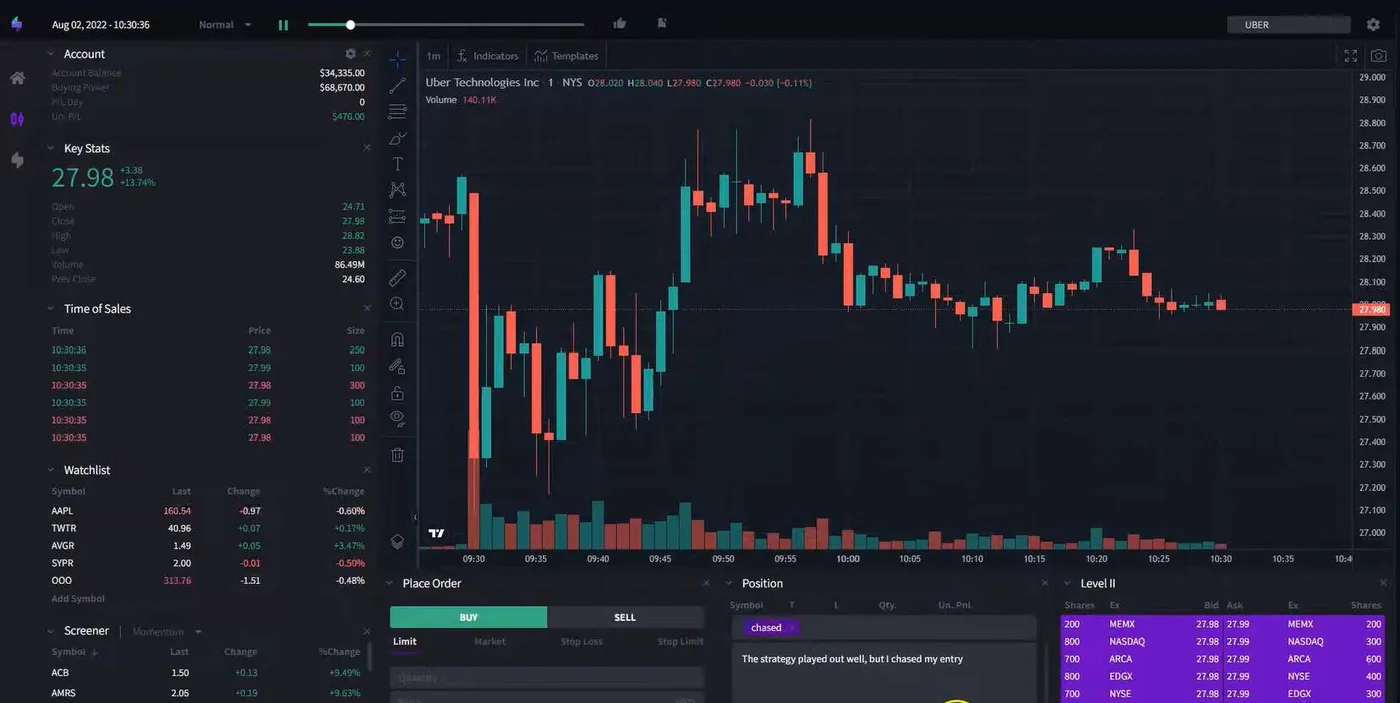
Market Replay reconstructs the chart at the moment you entered a completed trade and lets you step through it bar by bar or play it back at variable speed, essentially game film for your executions. What makes it notable is that the granularity scales across three tiers. The Pro plan offers one-minute bars, enough to review the general setup and whether your thesis played out. Premium sharpens that to one-second bars, which is detailed enough for most day traders to scrutinize entries and exits where a few seconds separated a good fill from a bad one.
The Elite tier is where it becomes genuinely specialized: 250-millisecond bars paired with Level II order book data, reconstructing the bid/ask spread and order flow at the exact instant you traded. For scalpers working off the tape, that is invaluable for judging whether limit placement was optimal or whether they were consistently filled worse than expected, and no other trading journal we know of offers replay at this depth. TraderSync actually splits replay into two tools. Trade Replay rewinds trades you placed; the Market Replay simulator lets you pick any past date and practise against replayed price action, with Time and Sales on screen, so it works for rehearsing setups as well as reviewing them. The catch is that the precision you practise at is set by your plan.
700+ Broker Integrations
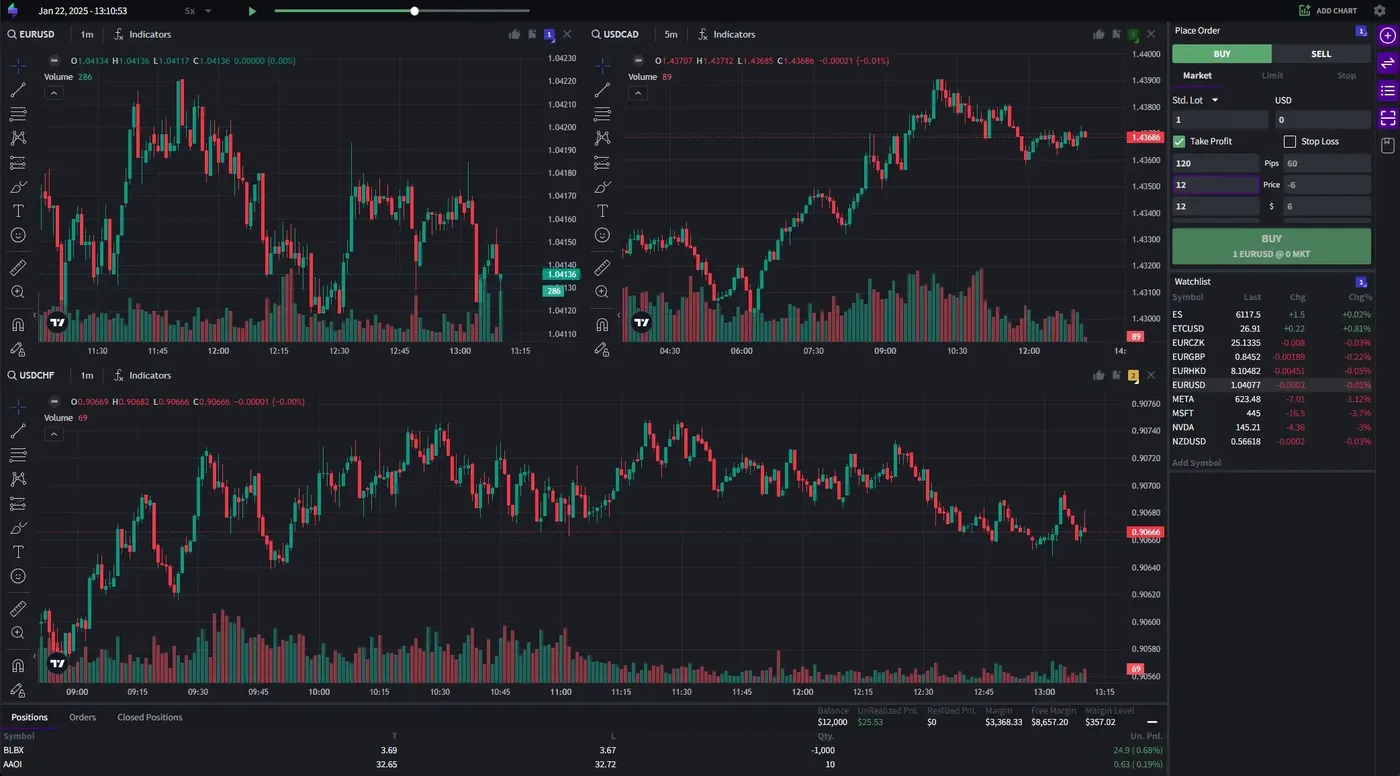
TraderSync's broker network is the largest in the industry and its most quantifiable advantage. TraderSync's own pricing page puts it at more than 700 brokers and trading platforms, and it covers effectively every mainstream retail broker plus a long tail of regional platforms, prop firms, and specialized futures and forex brokers that narrower networks tend to miss. For a trader on a common U.S. broker this may not register as a benefit, since any journal supporting a couple hundred platforms already covers the majors, but for anyone using an unusual broker or trading across several regions it can be the deciding factor.
The practical payoff is unification. Stocks from one broker, futures from another, and forex from a third can all live in a single journal under one set of analytics, instead of being scattered across separate tools or spreadsheets. This is a real edge over platforms that cover only the most popular brokers, and it is worth weighing seriously if your setup involves a less common platform that other journals simply cannot import from.
How Trade Import Works
TraderSync offers three routes for getting trades into the platform, and which one you use depends on your broker. For supported brokers with direct API connections, including major names like Interactive Brokers, Webull, Tastytrade, and TradeStation, trades sync automatically: link the account once and new fills flow in on their own, usually within minutes of execution. This is the smoothest workflow and it covers the most popular U.S. brokers well. For a broader look at hands-off logging, see our guide to the automated trading journal.
For brokers without an API hook, TraderSync accepts CSV and other file exports; you download your history and upload it, and the platform parses and maps the fields, with support for formats from hundreds of brokers including many prop firms and international platforms. Manual entry rounds things out for platforms with no export at all, or for logging paper and simulated trades, capturing ticker, direction, entry and exit price, size, timestamps, and fees plus optional notes and tags. Between the three methods it is hard to find a broker TraderSync cannot ingest in some form.
Strategy Checker and Discipline Tracking
The Strategy Checker is a rule-compliance tool rather than a strategy builder. You define your own rules, position-size caps, maximum daily loss, profit targets, permitted trading windows, and TraderSync then measures every trade against them. Over time you get a compliance percentage, a view of which rules you break most often, and a sense of how closely following your own plan correlates with actually making money, which is a pattern most traders feel but rarely quantify.
It is important to be clear about what this is not. The Strategy Checker helps you stick to a plan you already have; it does not help you build one. There are no ready-made strategy templates and no strategy library with attached performance analytics, so traders looking to document, test, and compare multiple approaches will find this thinner than what some competitors offer. As a discipline mechanism, though, it is genuinely useful, especially paired with Cypher AI flagging the behavioral slips that break those rules in the first place.
Systematic Backtesting
TraderSync's backtesting is systematic and rule-based rather than visual. You define entry and exit conditions using price-based logic drawn from a library of more than 70 technical indicators and over 100 candlestick patterns, then test those criteria against a universe of 30,000-plus assets. For systematic traders building indicator-driven strategies, this is a capable engine that can validate an idea across a large sample without manual chart work.
The limitation is the workflow it does not support. Discretionary traders who prefer to place trades bar by bar on historical charts, reading price action as if trading live, should look at the Market Replay simulator rather than this module, and there are no built-in ICT indicators. The automated backtester suits a rules-first style of trader; if your process is discretionary and chart-driven, confirm the replay precision on your plan matches how you actually work before leaning on it.
Best-in-Class Mobile Apps
TraderSync's native iOS and Android apps are, in our view, the best in the trading journal space, and for phone-first traders they are reason enough to consider the platform on their own. They offer near-complete parity with the desktop experience: full trade logging with every field available, setup categorization, tags and notes, the analytics dashboard with P&L curves and win-rate breakdowns, Cypher AI access, and even Market Replay, all from your pocket. You can log a trade with full context seconds after closing it rather than waiting to get back to a desk.
Push notifications extend the value, surfacing Cypher AI insights, daily performance summaries, and rule-compliance alerts from the Strategy Checker without you having to open the app and go looking. A few things are simplified on mobile, the backtesting module is desktop-only, some advanced reports are pared back, and detailed 250ms Level II replay is naturally better on a large screen, but the core log-review-coach loop is functionally complete. This is a clear advantage over competitors that either ship no app at all or offer only a limited mobile web view.
TraderSync pricing (2026)
TraderSync runs three tiers - Pro at $29.95, Premium at $49.95 and Elite at $79.95 a month - and the structure matters as much as the numbers: the features people most associate with the platform are spread across the plans rather than bundled into the entry price. There is a 7-day free trial on every tier, a genuine plus over rivals that demand payment upfront, and annual billing is heavily discounted. The catch is that unlocking the marquee capabilities, sharper replay and more AI coaching, means climbing the ladder. Prices were checked on tradersync.com on 1 October 2026.
| Plan | Month-to-month | Annual (per month) | Per year | Who it's for |
|---|---|---|---|---|
| Pro | $29.95 | $14.97/mo (sale) | $179.64 (sale) | Up to 5 accounts, 1-minute replay, 5 Cypher messages a day |
| Premium | $49.95 | $22.47/mo (sale) | $269.64 (sale) | Unlimited accounts, 1-second replay, 15 Cypher messages a day |
| Elite | $79.95 | $31.98/mo (sale) | $383.76 (sale) | 250ms replay with Level II, options replay, 60 Cypher messages a day |
Free trial vs free plan: what you get before paying
TraderSync has a 7-day free trial on Pro, Premium and Elite, and no permanent free plan. When the trial ends you pick a paid tier or stop. If a free-forever journal matters to you, TradeOlogy has one with no trade cap and Tradervue has one capped at 30 trades a month.
Monthly vs annual: what TraderSync costs per year
Paid month to month, a year costs $359.40 on Pro, $599.40 on Premium and $959.40 on Elite. Annual billing is where TraderSync discounts hard: when we checked on 1 October 2026 a sale of up to 60% off put a year at $179.64 for Pro, $269.64 for Premium and $383.76 for Elite, which works out to $14.97, $22.47 and $31.98 a month. Treat those as promotional figures rather than a permanent price list - the annual rate moves with whatever offer is running - but the pattern holds: if you intend to stay, annual billing roughly halves the bill.
Which TraderSync tier you actually need
Pro covers journaling, analytics and one-minute replay for up to five accounts, which is enough for swing traders and most part-time day traders. Step up to Premium for one-second replay, unlimited accounts and more Cypher messages. Elite is for scalpers who review fills against Level II and tape at 250ms, or who replay options.
TraderSync broker integrations: the full picture
TraderSync's pricing page claims connections to more than 700 brokers and trading platforms. That is still the longest list we have seen in the category - TradeZella advertises 500+ and Tradervue 80+ - and it is the main reason traders with unusual setups end up here.
How the 700+ list breaks down
The network covers mainstream US retail brokers, the futures platforms and prop firms that funded traders use, forex and CFD brokers, crypto exchanges, and a long tail of regional and international platforms that narrower lists miss. Stocks, forex, crypto, futures, equity options and futures options are all supported asset types on every plan.
Direct sync vs file import
For brokers with a direct connection, including Interactive Brokers, Webull, Tastytrade and TradeStation, you link the account once and fills arrive on their own. Everything else comes in by file: export your history, upload it, and TraderSync maps the fields. Pro syncs up to five accounts; Premium and Elite are unlimited.
Popular brokers and platforms
If you trade through one of the big platforms, our broker guides walk through the export and sync steps and compare the journals that handle each one: thinkorswim journal setup, trading journal for Interactive Brokers, trading journal for Tradovate, trading journal for NinjaTrader, trading journal for Webull, and trading journal for MT4 or MT5.
Forex is a particular strength: currency pairs are supported in the journal and in Market Replay on every plan, which is why TraderSync leads our list of the best trading journal for forex.
Does TraderSync support crypto?
Yes. Crypto is a supported market on every TraderSync plan, in the journal, in Trade Replay and in Market Replay, and TraderSync's crypto page advertises support for more than 50 exchanges. That makes it one of the stronger choices for traders who run crypto alongside stocks or futures and want one set of analytics for all of it.
Supported crypto exchanges
TraderSync names Binance, Bybit, Coinbase and Kraken as exchanges it syncs with automatically, and also lists KuCoin, Huobi and Crypto.com among its crypto integrations. Check the supported-brokers page for smaller exchanges before you commit; the 50+ figure is TraderSync's own.
How crypto trades import
Linked exchanges sync on their own, so spot and futures trades are logged without manual entry, and TraderSync supports USDT and USDC perpetual contracts. Exchanges without a direct connection import by file upload, the same fallback the platform uses for brokers. Reports can then be cut by coin and trading pair.
What to watch for when journaling crypto
Crypto trades around the clock, so time-of-day reports matter more than they do for a market with an opening bell: they show which sessions you actually trade well in. Leverage and perpetual funding change your real P&L, so confirm fees are being picked up on your first imports. And if you practise in Market Replay, remember precision follows the plan - one-minute on Pro, one-second on Premium, 250ms on Elite.
If crypto is a requirement, note that Tradervue does not support it at all, while TradeZella and TradeOlogy both do.
TraderSync pros and cons
What we liked
- Enormous broker/integration list (700+), including 50+ crypto exchanges
- Strong iOS and Android apps
- Conversational AI for strategy analysis
Where it falls short
- Top-tier pricing climbs steeply
- UI feels more dated than newer rivals
- Replay precision and AI usage are tiered - one-second and 250ms replay need Premium and Elite
Who TraderSync is for
A good fit if…
- Mobile-first traders who do most of their logging and review from a phone or tablet, since TraderSync's native apps are the strongest in the category
- Scalpers and execution-focused traders who need to review fills at sub-second precision with Level II order book data on the Elite tier
- Self-directed traders who respond well to coaching and want a conversational AI they can question and get feedback from rather than a static report
- Multi-broker and international traders using less common platforms, where the 700+ integration network is unlikely to leave any account unsupported
- Systematic traders building indicator-based strategies who want rule-driven backtesting across a large universe of assets
- Crypto traders who also trade stocks, futures or forex and want every exchange and broker in one journal
Look elsewhere if…
- Beginners who need structure, since there is no built-in education platform, no strategy templates, and no guided learning path
- Traders who want ready-made strategy templates or built-in ICT indicators, neither of which TraderSync offers
- Educators and coaches who need a mentor mode to review students' journals, which TraderSync does not offer
- Budget-conscious traders who want the full feature set cheaply, since the differentiated tools sit on the pricier Premium and Elite tiers
- Traders who prefer a clean, modern interface, as TraderSync's design feels dated next to newer competitors
TraderSync alternatives and comparisons
TraderSync sits at our #3 spot, behind our top pick TradeOlogy, and the contrast between them is fairly clean. TraderSync's calling cards are reach and coaching: the widest broker network in the category at 700+ integrations, the best native mobile apps we have tested, a conversational Cypher AI coach, and market replay that can drop to 250-millisecond precision with Level II data for scalpers. If your broker is obscure, you journal mostly from a phone, or you specifically want sub-second execution review, TraderSync does things no other journal quite matches, and those are real, defensible strengths rather than marketing gloss.
TradeOlogy takes the top spot on value, interface, and on-ramp. It offers a free-forever tier and a Pro plan from $15/mo, roughly half the effective cost of TraderSync's mid and upper plans, while auto-syncing 25+ brokers and covering the same stocks, options, futures, and crypto. Its interface is cleaner and more modern where TraderSync's feels dated, and it bundles a built-in trade simulator into that lower price. Our honest read is that TraderSync earns its place for traders who need its specific edges and will pay for them, while TradeOlogy delivers most of the day-to-day journaling value with a friendlier price and an easier start, which is why it edges ahead overall.
How TraderSync compares to our top pick
TraderSync is a capable journal, but on our overall scoring it sits behind TradeOlogy (9.4/10), which pairs 25+ broker auto-sync and a customizable analytics dashboard with a free-forever tier and paid plans from $15/mo.
Read the TradeOlogy review →Free Trading Journal Template
Track your trades, analyze performance, and improve your strategy. Enter your email to get the free spreadsheet.
No spam. Just the template link.
TraderSync - FAQ
Does TraderSync have a free trial or free plan?
TraderSync offers a 7-day free trial on every tier, which is an advantage over rivals that require payment upfront, but there is no permanent free plan. Paid tiers start at $29.95/mo month-to-month, with a steep discount on annual billing. If a genuinely free-forever option matters to you, our top pick TradeOlogy has one.
How does Cypher AI actually work?
Cypher AI is a conversational coach built into your dashboard. You ask plain-language questions about your trading, such as your win rate on breakout setups or your most profitable time of day, and it answers from your real logged trades while proactively flagging behavioral patterns like revenge trading. It becomes meaningfully more useful after 50 to 100 logged trades, and usage is metered by plan: 5 Cypher messages a day on Pro, 15 on Premium and 60 on Elite.
What makes TraderSync's market replay different?
Replay precision scales with your plan: one-minute bars on Pro, one-second on Premium, and 250-millisecond bars with Level II order book data on Elite. That sub-second Elite tier is unique in the trading journal space and is aimed at scalpers who need to see exactly how the order book looked at the moment of entry. Trade Replay rewinds trades you actually placed, while the Market Replay simulator lets you pick a past date and practise against replayed price action.
How many brokers does TraderSync support?
More than 700 according to its own pricing page, the widest network of any trading journal we have reviewed. It covers mainstream U.S. brokers, a long list of prop firms, and many regional and international platforms. Trades come in by direct API sync for supported brokers, by CSV and file upload for the rest, or by manual entry, and the platform handles stocks, options, futures, forex, and crypto.
Does TraderSync have a mobile app?
Yes, and it is a genuine strength. TraderSync ships native iOS and Android apps with near-complete desktop parity, including full trade logging, analytics, Cypher AI, and Market Replay, plus push notifications for AI insights and rule-compliance alerts. Backtesting and some advanced reports are desktop-only, but the core journaling workflow is fully available on mobile, which is more than most competitors offer.
Does TraderSync have strategy templates or backtesting?
There are no ready-made strategy templates; the closest feature is the Strategy Checker, a rule-compliance tool that tracks whether you follow your own trading rules. Backtesting exists but is systematic and rule-based, letting you test price-based criteria against a large asset universe with 70+ indicators, rather than the visual, chart-by-chart backtesting some discretionary traders prefer.
Does TraderSync support crypto exchanges like Coinbase and Binance?
Yes. TraderSync lists Binance, Bybit, Coinbase and Kraken as exchanges it syncs automatically, plus KuCoin, Huobi and Crypto.com, and advertises more than 50 supported crypto exchanges in total. Spot and futures trades are covered, including USDT and USDC perpetuals.
Is TraderSync free?
Only for seven days. TraderSync has a 7-day free trial on all three plans but no free-forever tier; after the trial, Pro is $29.95 a month, Premium $49.95 and Elite $79.95, with large discounts on annual billing.
TraderSync vs TradeZella: which is better?
TraderSync wins on broker reach (700+ against 500+), native mobile apps and sub-second replay; TradeZella wins on strategy templates, prop-firm tracking and interface polish. We go through it point by point in TradeZella vs TraderSync.